Importing Participant Options into Events in NXT



Does anyone have a workaround for adding Participant Options to events in webview in bulk?
If I'm understanding correctly, Participant Options is a webview only field that doesn't map to Participant Attributes in database view. This means that it can't be imported, right? I'm hoping there is some way I can avoid adding all my participant options manually.
Answers
-
the only "bulk" option for Participant Options would be through SKY API
If you never used Power Automate and SKY API before, there's a learning curve, but for what you want to do, it's not too difficult and would open a huge door. If you want to get started, you can check this link out first.
2 -
If I've needed the participant options saved, then I export direct from the participants on the event and then import into RE7 using our usual processes. (I've also made some strong arguments around 'do we need to retain this information beyond the event, because you can do everything straight from NXT… ?' :D)
2 -
Jack's recommendation should work. My thoughts are this may be part of the major change in using webview transition - forcing us to embrace the webview.
0 -
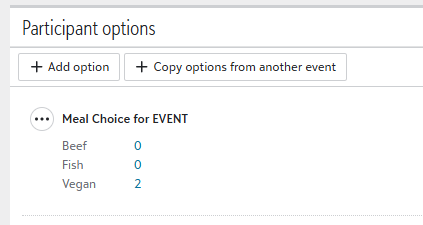
@Jack Briggs I can't even see that the participant options are exportable via query. I added this participant option to an event that I added to train new staff. I gave it this terrible name so that I would recognize it when it was exported via query. @Emily Weiss you are asking specifically about the participant options; these options are not visible in dbv when recorded in wv, correct?
 0
0 -
Hi @Jeannie Goings yes that's correct! i have added participant options but they aren't visible in dbv
I'm asking because I have an event RSVP tracker that is currently being kept in a spreadsheet, but I need to transfer it to NXT and resume tracking responses there. It will be cumbersome to add all the participant options by hand since a ton of info already exists in the spreadsheet :(
0 -
Emily, @Alex Wong is correct. Post event participant option is available through SKY API.
1 -
@Jeannie Goings Apologies for being unclear - I go into the event directly from NXT Event Overview, then select 'work with participants', adding whatever columns I require, and export the spreadsheet from there. Basically, you don't use Query at all for my 'method'.
0














Categories
- All Categories
- New YourCause Community TEST
- New SKY Community TEST
- New Grantmaking TEST Community
- New Altru Test Community
- New bbcon Community - TEST
- 12 Blackbaud Agents for Good™
- New Raiser's Edge NXT Community
- 7 Blackbaud Community Help
- 218 bbcon®
- 1.4K Blackbaud Altru®
- 409 Blackbaud Award Management™ and Blackbaud Stewardship Management™
- 1.2K Blackbaud CRM™ and Blackbaud Internet Solutions™
- 16 donorCentrics®
- 361 Blackbaud eTapestry®
- 2.7K Blackbaud Financial Edge NXT®
- 681 Blackbaud Grantmaking™
- 599 Blackbaud Education Management Solutions for Higher Education
- 3.3K Blackbaud Education Management Solutions for K-12 Schools
- 952 Blackbaud Luminate Online® and Blackbaud TeamRaiser®
- 85 JustGiving® from Blackbaud®
- 7K Blackbaud Raiser's Edge NXT®
- 3.9K SKY Developer
- 257 ResearchPoint™
- 123 Blackbaud Tuition Management™
- 165 Organizational Best Practices
- 247 Member Lounge (Just for Fun)
- 40 Blackbaud Community Challenges
- 37 PowerUp Challenges
- 3 (Closed) PowerUp Challenge: Grid View Batch
- 3 (Closed) PowerUp Challenge: Chat for Blackbaud AI
- 3 (Closed) PowerUp Challenge: Data Health
- 3 (Closed) Raiser's Edge NXT PowerUp Challenge: Product Update Briefing
- 3 (Closed) Raiser's Edge NXT PowerUp Challenge: Standard Reports+
- 3 (Closed) Raiser's Edge NXT PowerUp Challenge: Email Marketing
- 3 (Closed) Raiser's Edge NXT PowerUp Challenge: Gift Management
- 4 (Closed) Raiser's Edge NXT PowerUp Challenge: Event Management
- 3 (Closed) Raiser's Edge NXT PowerUp Challenge: Home Page
- 4 (Closed) Raiser's Edge NXT PowerUp Challenge: Standard Reports
- 4 (Closed) Raiser's Edge NXT PowerUp Challenge: Query
- 822 Community News
- 3.1K Jobs Board
- 57 Blackbaud SKY® Reporting Announcements
- 47 Blackbaud CRM Higher Ed Product Advisory Group (HE PAG)
- 19 Blackbaud CRM Product Advisory Group (BBCRM PAG)