Videos to show how consent and categories work between NXT and CC





Hi from New Zealand :) We are onboarding CC (with great support from the CC Brisbane office). We think we have figured out the consents, categories and channels as we have had to work out the terminology between them. However what I wanted to know is if there is videos to show how it all works and/or other demonstrations.
Also as I understand it, we don't need to use solicit codes as much as as we have in the past.? Thank you, Louise
Answers
-
Hi there! The AMA with Constant Contact is now closed, but tagging in @Matthew Montoya to see if he can provide an answer. Thanks!
0 -
That would be great, it would be good to have a view (or screen-shots) of how Consent/Categories looks (if you aren't using solicit codes as well). Thank you
0 -
@Louise Lawrence continuing to try and track down some resources for you. I went ahead and moved this into Raiser's Edge NXT discussions as well. I'm also reaching out to some contacts at Constant Contact!
0 -
Hello Louise,I apologize for the delay. Here's an FAQ that talks through consent categories:
In NXT:
1. Go to Raiser's Edge NXT, then go to "Settings"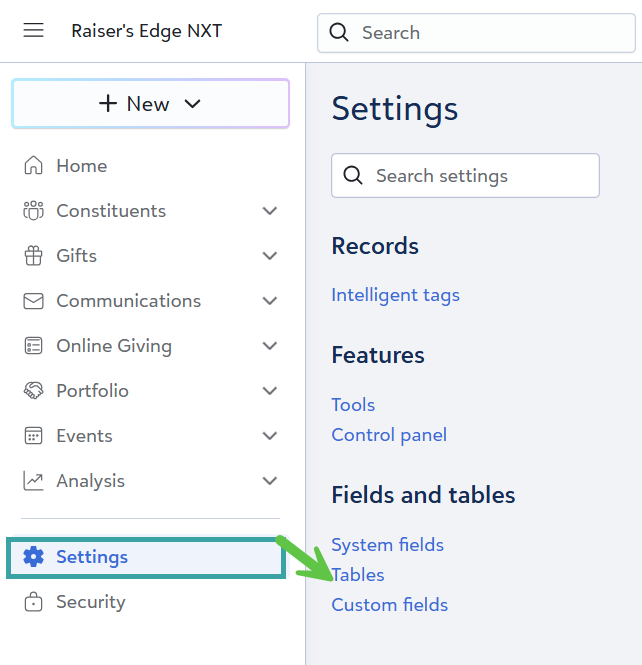
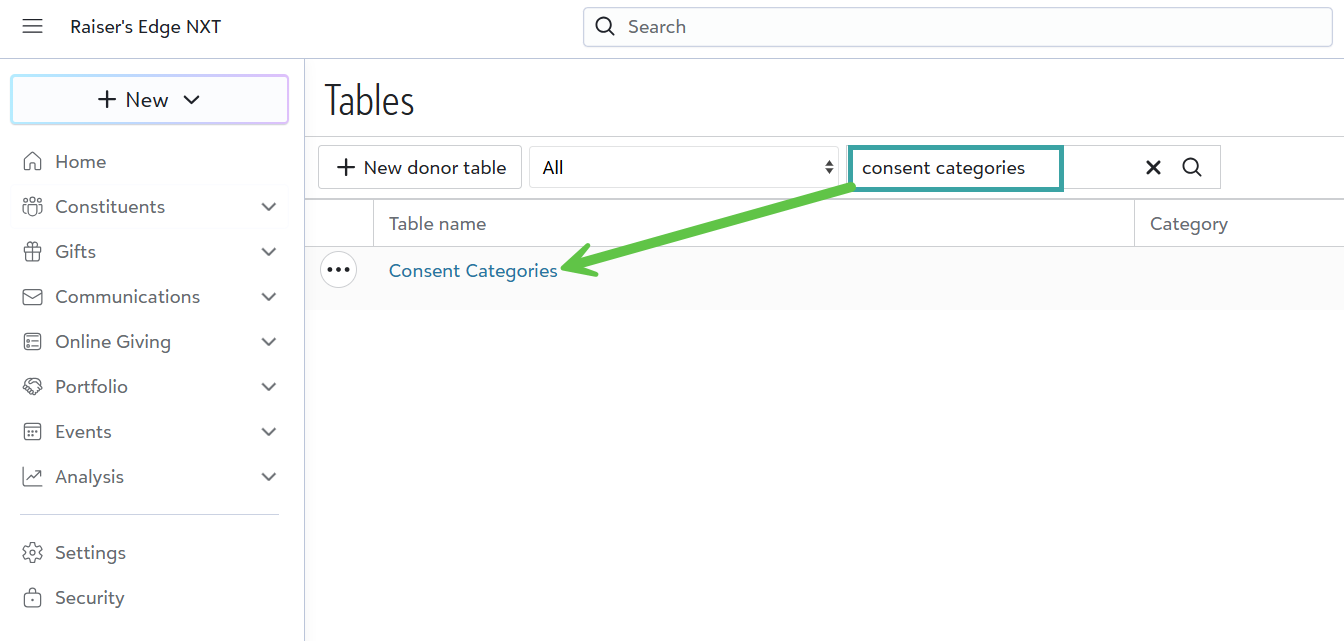
2. Click on "Tables" and then go to "Consent Categories"
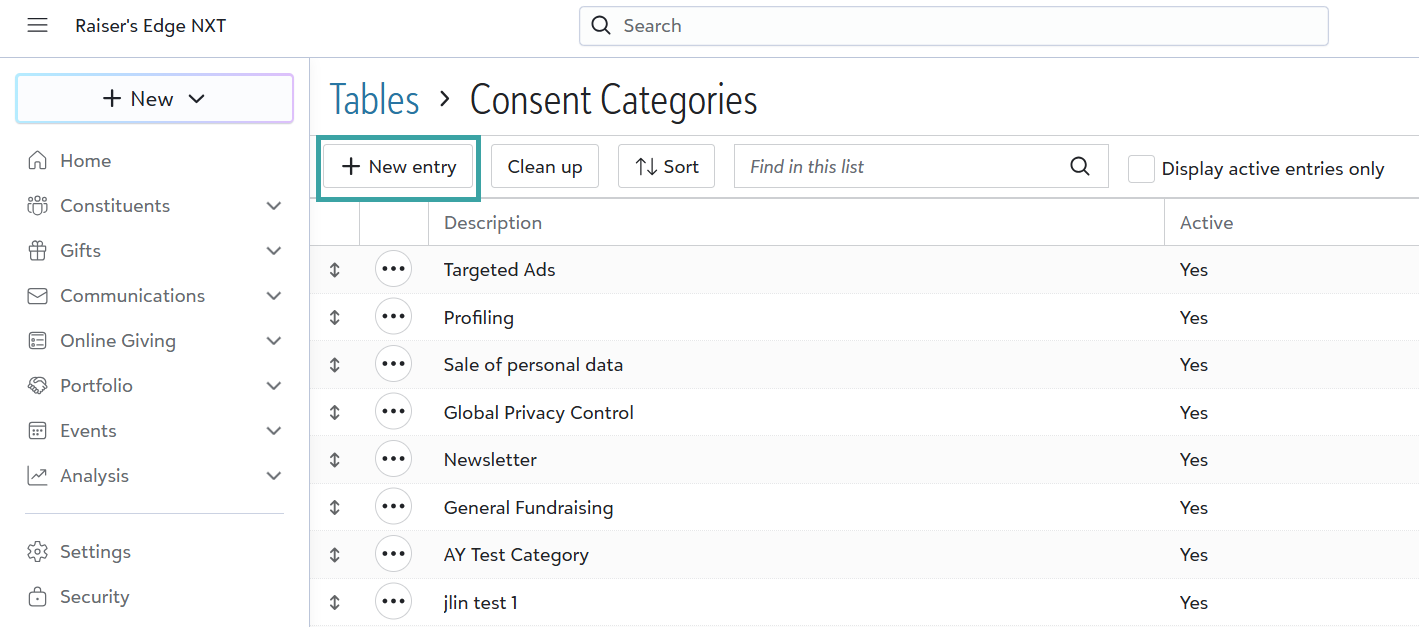
3. Then click on "New Entry"
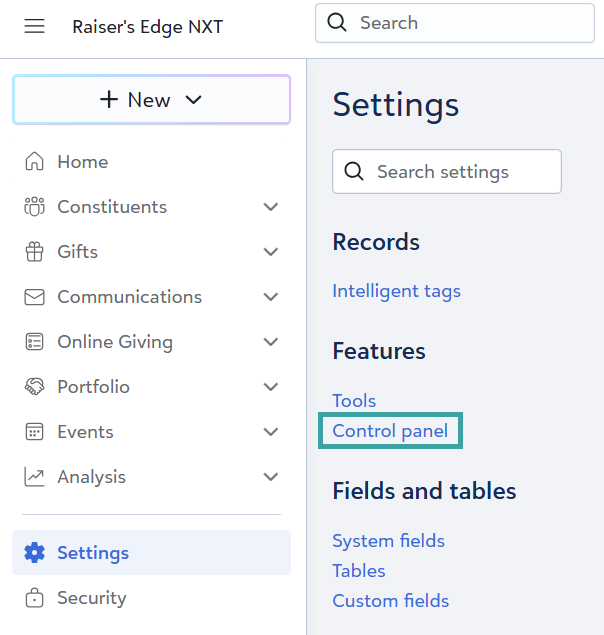
4. Once you've built out consent categories. Click on "Settings" and then "Control Panel" again:
5. Click on "Consent Management" and "Edit Channel Settings".
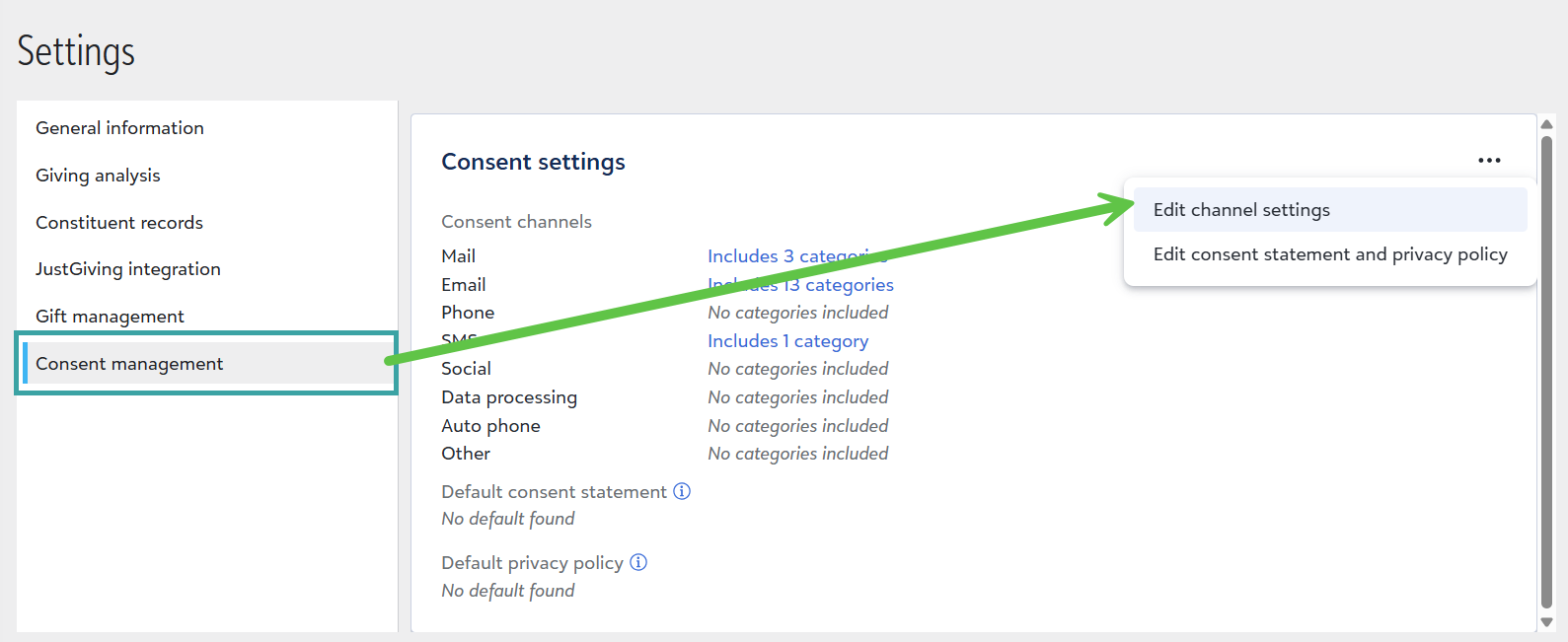
6. Add the proper categories to your "Email Consent"
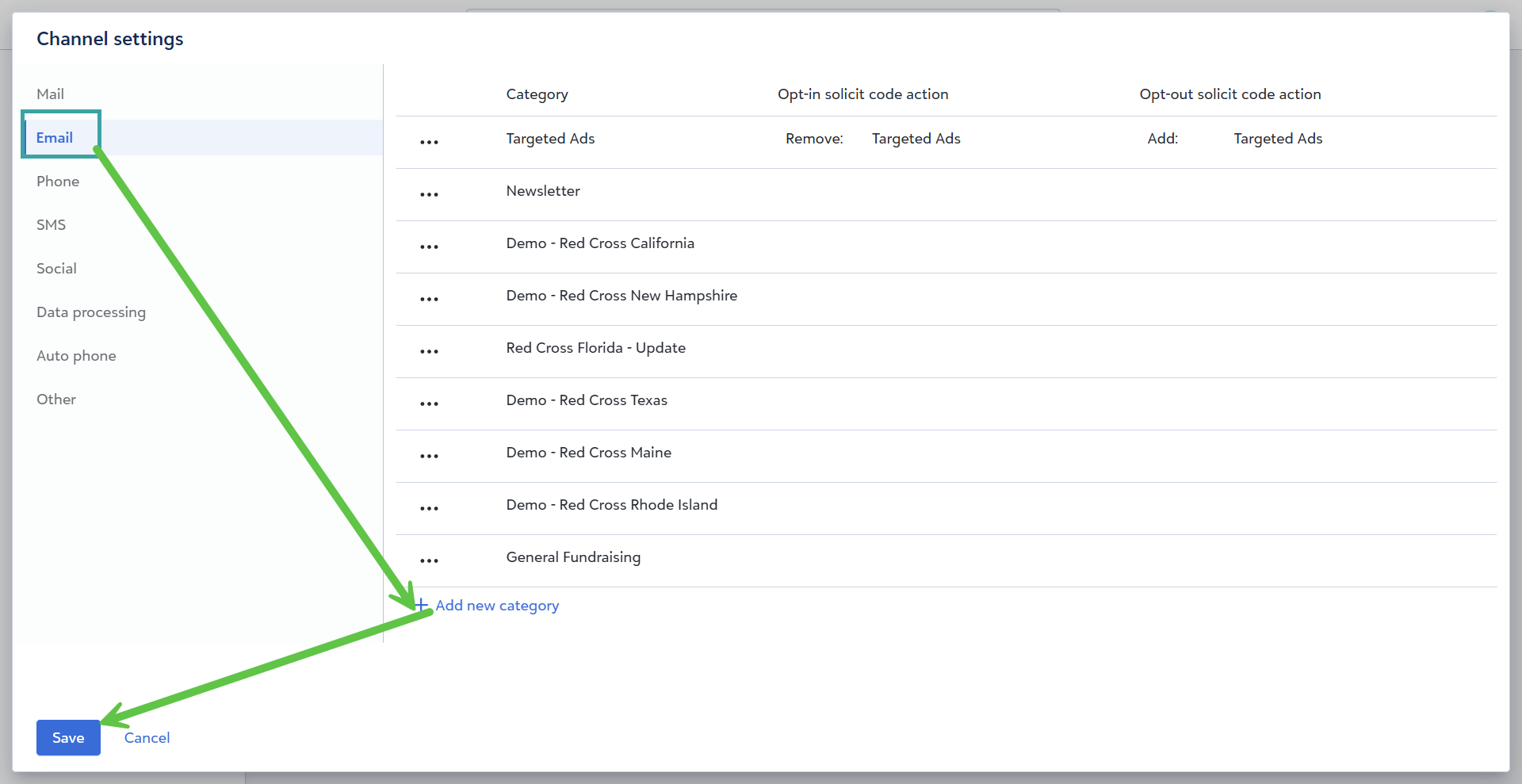
Once these are added, you can add constituents to different Constant Contact accounts (one consent category per Constant Contact account). This way if someone unsubscribes from one they're not unsubscribed from others.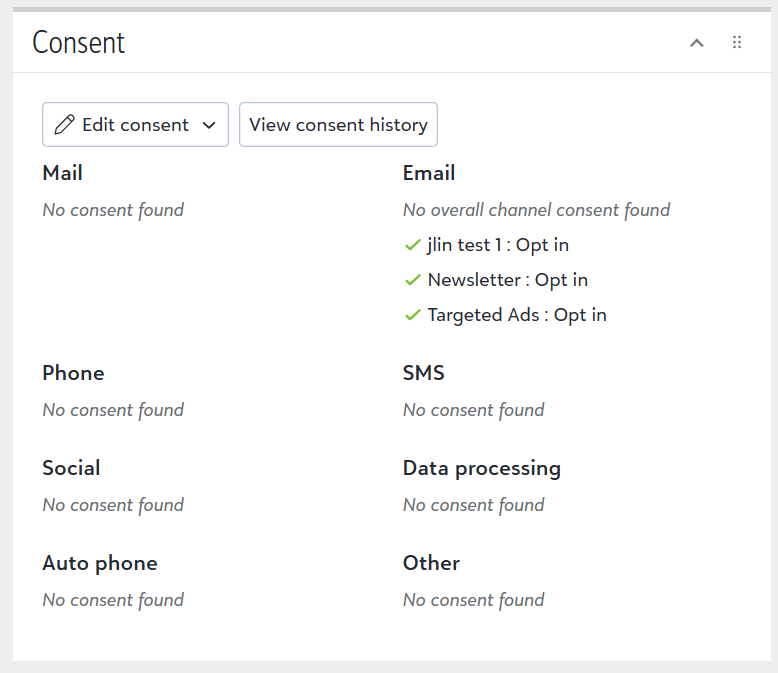
Thanks and let me know if you have any questions!
Thomas
0 -
Hi Thomas, thank you for that. We do have a lot of that set up but it was to see how it worked without using Solicit Codes. I think we have it correct based on your screen-shots
0 -
Another question I had was that currently NXT lists don't feature the ability to filter on Consent and the channels. That is a bit of a pain, as we are relying on making RE Classic queries (to encompass our quirks :) ) to turn into NXT lists so with being static, it appears to make the refreshing a bit more complicated!
0









Categories
- All Categories
- New YourCause Community TEST
- New SKY Community TEST
- New Grantmaking TEST Community
- New Altru Test Community
- New bbcon Community - TEST
- 12 Blackbaud Agents for Good™
- New Raiser's Edge NXT Community
- 7 Blackbaud Community Help
- 218 bbcon®
- 1.4K Blackbaud Altru®
- 409 Blackbaud Award Management™ and Blackbaud Stewardship Management™
- 1.2K Blackbaud CRM™ and Blackbaud Internet Solutions™
- 16 donorCentrics®
- 361 Blackbaud eTapestry®
- 2.7K Blackbaud Financial Edge NXT®
- 680 Blackbaud Grantmaking™
- 598 Blackbaud Education Management Solutions for Higher Education
- 3.3K Blackbaud Education Management Solutions for K-12 Schools
- 952 Blackbaud Luminate Online® and Blackbaud TeamRaiser®
- 85 JustGiving® from Blackbaud®
- 7K Blackbaud Raiser's Edge NXT®
- 3.9K SKY Developer
- 257 ResearchPoint™
- 123 Blackbaud Tuition Management™
- 165 Organizational Best Practices
- 247 Member Lounge (Just for Fun)
- 40 Blackbaud Community Challenges
- 37 PowerUp Challenges
- 3 (Closed) PowerUp Challenge: Grid View Batch
- 3 (Closed) PowerUp Challenge: Chat for Blackbaud AI
- 3 (Closed) PowerUp Challenge: Data Health
- 3 (Closed) Raiser's Edge NXT PowerUp Challenge: Product Update Briefing
- 3 (Closed) Raiser's Edge NXT PowerUp Challenge: Standard Reports+
- 3 (Closed) Raiser's Edge NXT PowerUp Challenge: Email Marketing
- 3 (Closed) Raiser's Edge NXT PowerUp Challenge: Gift Management
- 4 (Closed) Raiser's Edge NXT PowerUp Challenge: Event Management
- 3 (Closed) Raiser's Edge NXT PowerUp Challenge: Home Page
- 4 (Closed) Raiser's Edge NXT PowerUp Challenge: Standard Reports
- 4 (Closed) Raiser's Edge NXT PowerUp Challenge: Query
- 822 Community News
- 3.1K Jobs Board
- 57 Blackbaud SKY® Reporting Announcements
- 47 Blackbaud CRM Higher Ed Product Advisory Group (HE PAG)
- 19 Blackbaud CRM Product Advisory Group (BBCRM PAG)