Recording preferred pronouns





Does anyone have a really easy work around for recording preferred pronouns on NXT? I know there is an idea on the ideas bank but it feels like this one is a long way off happening and its one of many sticking points my users have for switching to mainly using NXT. It needs to be clearly visible when opening a record so custom fields will not work. I thought about adding it to a summary note, but wanted to see if anyone has any other recommendations
Answers
-
I guess you could call it a work around. IMO, it the most clear. Create an add/sal format with each of the listing variations you want: he/him; she/her; they/them….
If you use a hierarchy for your formats you could have it appear listed right after the primary ones on the constituent summary. In db view I know you can insert a row wherever you want in the listing. I don't see that function in webview - just did a cursory glance.
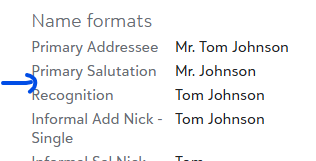
That's how I would do it if I needed that info at the front.
3 -
At a previous org we used a constituent note. In web view this information populates below the constituent name. I like JoAnn's recommendation because using an add/sal is isolated and can serve a singular purpose. Anything goes with constituent notes.
0 -
Add/Sal would be the way to go, I think. Or an alias, as those appear in the first frame too.
To be SUPER visible, you could add as constituent code, but that way may lie madness :D
1 -
We decided to use the Gender field, since pronouns are more important to us than stated or assumed gender. I added all of the pronoun options to the gender table and moved "male" and "female" to the bottom, since the system won't let me delete those.
3 -
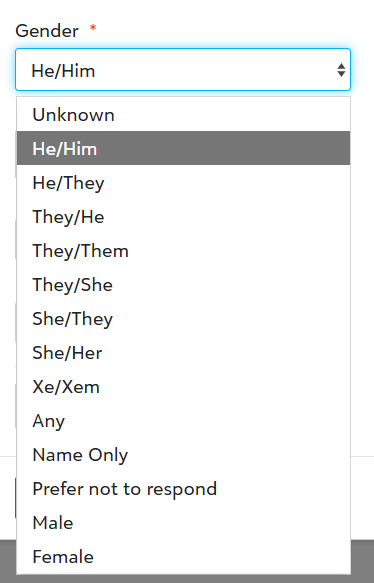
Here's the field as it shows currently when the development team is making a choice. Then it's visible right in the constituent summary.
0 -
I was asked to do this for an organization recently and set it up as an Additional Addressee Salutation with the type of "Pronouns". The options are then added as possible "formulas" in the Add/Sal table:
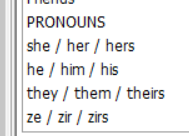
I explored a few options and this was the most visible and easiest to change. I shy away from Aliases because they are a little "clicky" to enter, users do not always add the type, and you cannot make updates to them via import or global change if needed. That may not apply in this scenario, but it is why Alias is not my first choice.
Gender is not readily visible in RENXT. Otherwise I like that option a lot, but visibility was a priority for them. Also ruled out notepads and attributes for the same reason. The note that appears directly under a constituent's name requires a specific notepad type, and they felt that other information was more important to record here so didn't want to claim this specific location for pronouns.2 -
We use the summary note option. If we have other pertinent information we need to have viewable, we typically add an alert that displays automatically.
0 -
One more for addressee/salutation and we will add an alert/annotation if we are NOT to use those pronouns with the student's parent.
4 -
We used attributes and added a business rule so that an alert box pops up if its populated that tells the user to check attributes - this also makes it easy to pull as a field in an export etc. if needed. We also use the "add summary note" in NXT, so that it shows up under a name while you are viewing a record :)
1 -
Summary notes and alert field would not work well for us. These are used for other info. While these fields were not used widely in the past, we are using them more and more for key info regarding the constituent / gifts.
Be sure to think long-term when planning where to put data. Sometimes it's easy to move elsewhere. And, as I've found in my 15+ years, sometimes it's not easy to move/repurpose.
Just my 2 cents.1 -
The options:
- Custom Field 😃
- Can be used as a filter and appear as a column in Constituent lists
- Can be queried/exported
- If Blackbaud adds a pronoun field, this option is ideal for easy export/import or global change to transition your data to that new field. Vote for this idea here:
- In my opinion, this is the best option, and the only option that uses the system as it is intended.
- Constituent Code 🤔
- Can be used as a filter and appear as a column in Constituent lists
- Can be queried/exported
- Could be risky depending on your data standards and how your organization uses constituent codes in reports/exports.
- Custom Addressee/Salutation 😊
- Can be queried/exported
- Could muddy up your addressee/salutation table
- Gender field 🤔
- Can be used as a filter and appear as a column in Constituent lists
- Can be queried/exported
- May be risky/tricky if your organization queries/segments/reports by gender for any reason
If you want the pronouns to be visible in the header, the best options are to use the Alert or Constituent Summary fields in addition to one of the options above, except for constituent codes (which are already included in the header).
⭐Important note: Please drop the word "preferred." Simply using "pronouns" is more inclusive. "Preferred" implies that there is a norm, and the pronouns someone uses are optional or up for debate.
2 - Custom Field 😃
-
@Sunshine Reinken Watson Thank you for sharing the piece about dropping "preferred" and for spelling out all the known options with the pros. I was planning to add that and love that you already had.
We currently use Custom Field of Pronouns with business rules.
Lots of great ideas here from everyone.1 -
We are using the Marital Status field. In DBV we changed the title of the field. Unfortunately, that change does not show on NXT. But the info is still front and center.
1





























Categories
- All Categories
- New YourCause Community TEST
- New SKY Community TEST
- New Grantmaking TEST Community
- New Altru Test Community
- New bbcon Community - TEST
- 12 Blackbaud Agents for Good™
- New Raiser's Edge NXT Community
- 7 Blackbaud Community Help
- 218 bbcon®
- 1.4K Blackbaud Altru®
- 409 Blackbaud Award Management™ and Blackbaud Stewardship Management™
- 1.2K Blackbaud CRM™ and Blackbaud Internet Solutions™
- 16 donorCentrics®
- 361 Blackbaud eTapestry®
- 2.7K Blackbaud Financial Edge NXT®
- 681 Blackbaud Grantmaking™
- 599 Blackbaud Education Management Solutions for Higher Education
- 3.3K Blackbaud Education Management Solutions for K-12 Schools
- 952 Blackbaud Luminate Online® and Blackbaud TeamRaiser®
- 85 JustGiving® from Blackbaud®
- 7K Blackbaud Raiser's Edge NXT®
- 3.9K SKY Developer
- 257 ResearchPoint™
- 123 Blackbaud Tuition Management™
- 165 Organizational Best Practices
- 247 Member Lounge (Just for Fun)
- 40 Blackbaud Community Challenges
- 37 PowerUp Challenges
- 3 (Closed) PowerUp Challenge: Grid View Batch
- 3 (Closed) PowerUp Challenge: Chat for Blackbaud AI
- 3 (Closed) PowerUp Challenge: Data Health
- 3 (Closed) Raiser's Edge NXT PowerUp Challenge: Product Update Briefing
- 3 (Closed) Raiser's Edge NXT PowerUp Challenge: Standard Reports+
- 3 (Closed) Raiser's Edge NXT PowerUp Challenge: Email Marketing
- 3 (Closed) Raiser's Edge NXT PowerUp Challenge: Gift Management
- 4 (Closed) Raiser's Edge NXT PowerUp Challenge: Event Management
- 3 (Closed) Raiser's Edge NXT PowerUp Challenge: Home Page
- 4 (Closed) Raiser's Edge NXT PowerUp Challenge: Standard Reports
- 4 (Closed) Raiser's Edge NXT PowerUp Challenge: Query
- 822 Community News
- 3.1K Jobs Board
- 57 Blackbaud SKY® Reporting Announcements
- 47 Blackbaud CRM Higher Ed Product Advisory Group (HE PAG)
- 19 Blackbaud CRM Product Advisory Group (BBCRM PAG)