Handling Deferred Enrollment - retaining admissions info from original entering year





Hi all,
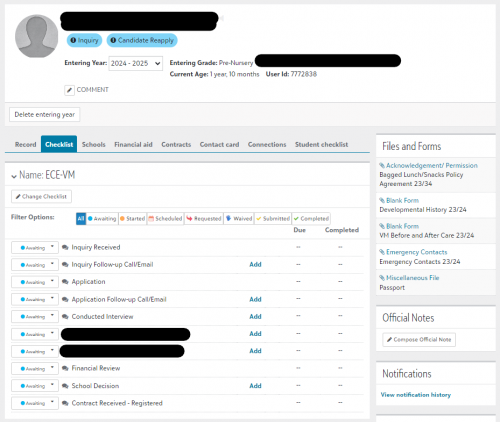
I posted a more general question about this in in July here. My question now is how to actually handle these students in EMS. We can “re-apply” them to the coming year so they have the correct entering year, which is fine for allowing us to assign contracts accordingly. However all data from admissions checklists, submitted files, etc. are tied to the previous admissions year.
Any way to pull that into the coming year? Or would the best way be to just change the original entering year to the coming year, and we'd know based on checklist step dates and “deferred” decision type that they're a deferred enrollment?
Example student:

Comments
-
@Daniel Wallach
I'm having the same issue. Have you figured anything out?0 -
I know this is an old thread, but wondering if you figured out a process that works?
0 -
All,
You have to re-apply the user for the new school year so that you can retain the previous year activity. Do not just change the entering year. That would really mess up all your reporting etc. We add all candidate submission under records>Misc file uploads and re-apply the user if they are rolling over to next cycle. We want to see what the decision was for the prior year etc. By re-applying the they will have an updated checklist to complete, but you can waive some stuff if you need to also. I have managed this process for the past few years now and this method works efficiently. Feel free to reach out if you have questions.
0 -
We do the same thing as @Ami Naik. We retain everything on the existing 'Entering Year' and change their status to 'withdraw' to reflect that they denied our acceptance and withdrew for the admissions process this particular year, and then we proactively add the next 'Entering Year' and start populating things over or proactively waiving items on the new checklist to get them back to an active status for the following year. We also document in 'Internal Notes' the story of what happened.
1










Categories
- All Categories
- New YourCause Community TEST
- New SKY Community TEST
- New Grantmaking TEST Community
- New Altru Test Community
- New bbcon Community - TEST
- 12 Blackbaud Agents for Good™
- New Raiser's Edge NXT Community
- 7 Blackbaud Community Help
- 218 bbcon®
- 1.4K Blackbaud Altru®
- 409 Blackbaud Award Management™ and Blackbaud Stewardship Management™
- 1.2K Blackbaud CRM™ and Blackbaud Internet Solutions™
- 16 donorCentrics®
- 361 Blackbaud eTapestry®
- 2.7K Blackbaud Financial Edge NXT®
- 680 Blackbaud Grantmaking™
- 598 Blackbaud Education Management Solutions for Higher Education
- 3.3K Blackbaud Education Management Solutions for K-12 Schools
- 952 Blackbaud Luminate Online® and Blackbaud TeamRaiser®
- 85 JustGiving® from Blackbaud®
- 7K Blackbaud Raiser's Edge NXT®
- 3.9K SKY Developer
- 257 ResearchPoint™
- 123 Blackbaud Tuition Management™
- 165 Organizational Best Practices
- 247 Member Lounge (Just for Fun)
- 40 Blackbaud Community Challenges
- 37 PowerUp Challenges
- 3 (Closed) PowerUp Challenge: Grid View Batch
- 3 (Closed) PowerUp Challenge: Chat for Blackbaud AI
- 3 (Closed) PowerUp Challenge: Data Health
- 3 (Closed) Raiser's Edge NXT PowerUp Challenge: Product Update Briefing
- 3 (Closed) Raiser's Edge NXT PowerUp Challenge: Standard Reports+
- 3 (Closed) Raiser's Edge NXT PowerUp Challenge: Email Marketing
- 3 (Closed) Raiser's Edge NXT PowerUp Challenge: Gift Management
- 4 (Closed) Raiser's Edge NXT PowerUp Challenge: Event Management
- 3 (Closed) Raiser's Edge NXT PowerUp Challenge: Home Page
- 4 (Closed) Raiser's Edge NXT PowerUp Challenge: Standard Reports
- 4 (Closed) Raiser's Edge NXT PowerUp Challenge: Query
- 822 Community News
- 3.1K Jobs Board
- 57 Blackbaud SKY® Reporting Announcements
- 47 Blackbaud CRM Higher Ed Product Advisory Group (HE PAG)
- 19 Blackbaud CRM Product Advisory Group (BBCRM PAG)