BBID for all users in Blackbaud Education Management




I have not begun the process of setting up BBIDs for my constituents. Are there any schools that can share the easiest way to handle this conversion for parents? Communications that you sent to parents prior to the transfer? How-tos?
Thank you very much! Anne Gorman
Comments
-
@Anne Gorman - We completed the conversion process for parents about a year ago. Links to the documents I used are below. You may use any of it that you find useful.
We did the conversion during the school year instead of waiting until summer. We had full Tech department support available, and parents were less likely to put off doing the process until later.
We did the conversion in small batches - first with 20 or so parents at a time, then 50 or so at a time. This helped to avoid a large number of parents contacting us for help at one time, and it allowed us to fine-tune the instructions.
Document 1 - Message sent in regular newsletter via push page.
Document 2 - text of the automated email invitation - navigation instructions are at the top of the doc. The email contains a link to document 1 as a PDF and to document 3 as a Google Doc.
Document 3 - Step-by-step instructions - distributed as a link to a public Google Doc. That allowed me to modify the instructions based on the questions I got from parents.
We also modified the Help link on our sign-in screen. Take a look at it to get ideas of what you should include in yours.
Core > Settings > Custom labels & text > Custom text/messages
- category: Sign In
- Sign In Help/Request Login Instructions
Core > Security > Blackbaud ID authentication will show you the status of all users (Registered, Awaiting response, or Unregistered). You can filter the list to show parents only, and you can export the list. The Awaiting Response tab is where I sent the email in Document 2.
You can import the BB-ID user names. Core > System Tools > Data import.
- Category: User Management
- Import type: BBID Username
I used the import process to control how many people I was converting at one time. The import assigns the username (and puts the user into the Awaiting Response status), but it does NOT send the automated email. Do that from the Awaiting Response tab.
Good luck.
4 -
Hi Anne! In the interest of not overwhelming our families with a million emails, we plan to send the following communication prior to beginning the conversion process, which we will start on May 2. See link below:
https://docs.google.com/document/d/1r0zOFe3osJA4DBebEnqy29-M1130ZYyLWiKRueb3b2M/edit?usp=sharing
We are not planning to send the invitation emails automatically; instead, we are just going to flip the switch, and users will convert the next time they log in. As with Brian, we plan to include a shorter version of these instructions in weekly newsletters beginning the week of April 11.
After looking through the documentation and doing a few trial runs of test accounts, it actually seems a little less terrifying than we were afraid it might be. We'll keep everyone posted as we go through the process. Good luck to you!!
2 -
Hi Anne - we listed in our newsletter and used the BBID invitation email function when we transition the parents over. We decided to do in managable groups also - by grades. 90 student parents at a time and usually yielded about 10% needing support with logging/setting up their accounts. Although a lengthy process (12 weeks) the biggest issue is the invitation email not being addressed. We still have about 25 parents that we are still working with to convert - we are taking 1 at a time off legacy login, to connect daily. Incognito browsers were our BEST friend durning this transition!! Our goal is to have all transitioned over by May 10th, if we wait longer we will have to deal with issues in August when school starts because few parents login over the summer. Hope this helps
1 -
Thank you so much to all the wonderful responses. I appreciate everyone’s insights and helpful tips. I’m breathing a bit better now.
Anne1 -
Thanks for this!
0 -
All - I wanted to bring this to your attention because I stumbled across it in the Ideas bank looking for something else and it's very germane to the conversion for those who haven't completed it yet.
This idea:
is about users who have converted to BBID being logged in anyway when they enter a legacy ID. I totally understand Blackbaud wanting nothing to do with that, as it completely defeats the purpose of BBID, so I didn't vote for it. However, currently when a user tries to log in with a legacy ID after that user has converted to BBID, the only message that displays is "sign in failed, please try again".
I had a nightmarish vision where support gets a bazillion emails asking why users can't log in, and instead of us having to re-type a million times "please log in with your BBID", it would be very helpful if when a user tries to log in using a legacy ID, the login screen displays "you are using a deprecated ID; please log in with your BBID" or something similar. That would provide a level of utility that wouldn't overburden IT staff, and would also continue to encourage BBID adoption.
@Sarah Bienvenue, is this something you could run up the ladder prior to 7/26? Since that idea is old and has already been marked as “unlikely to implement”, I don't know if it would be seen or not, so I'm putting it here as well.
2 -
@Brian LeBlanc - the behavior you describe is (sorta kinda) what happens if the user has been assigned a BB-ID but has not yet completed the conversion process.
If the user enters the legacy username:
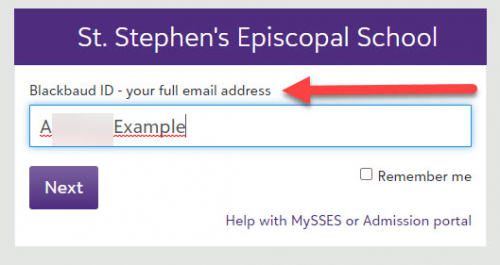
The screen says that the account is being converted to BB-ID (and even shows them what email address to use).
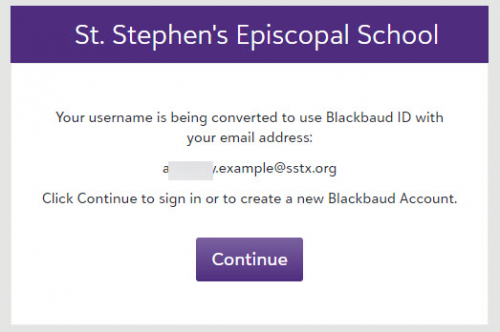
That's NOT what happens on subsequent sign-in attempts with the legacy username (after the BB-ID conversion process has been completed). The behavior you described would be helpful in that case.
I modified the text on the first sign-in screen to include a reference to Blackbaud ID and a full email address. That helped some.
I also turned off the setting that allows a user to request a password change on this screen, since it does not work for BB-ID. The Help screen (linked in the lower right of the first sign-in screen) includes a link to a document with instructions for resetting a BB-ID password.
1 -
@Brian Gray - that second scenario is what I'm referring to. Prior to the conversion, it isn't a big deal. But just seeing “sign in failed” doesn't really accomplish anything if people try to log in using a legacy ID that isn't their email address.
I feel like I should know this, but where do you go to modify the help link and the text that says “BBID - enter your email address”? I was poking around looking for it last night but couldn't find it anywhere.
0 -
@Brian LeBlanc - the sign-in configuration is scattered over several places…
The first screen's settings are on Core > Security > Authentication Settings, then Authentication rules tab. That allows you to disable the password change request and to set the text for above the username field and the text for the Help link.
The content of the Help screen is Core > Settings > Custom labels and text, then Custom text/messages tab. Set the category to Sign in and click View. Edit the entry for Sign In Help/Request Login Instructions.
0 -
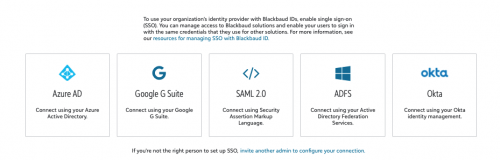
How do I determine which of these choices to select? We use Google for faculty/staff/students however, parents are on a variety of emails.
 0
0 -
Hi Brian - any chance you could elaborate on what ‘Flip the Switch’ was for you? I'm interested in going this route but was hoping for more detail.
0 -
….I may have found it. Under Core > Security > Blackbaud ID Authentication, select the people, click Connect (but don't use the send email invite option). Sound right?
0 -
D J Plante:
….I may have found it. Under Core > Security > Blackbaud ID Authentication, select the people, click Connect (but don't use the send email invite option). Sound right?
That's exactly the plan. We're not going to send the email invites to connect to BBID. Instead, we're going to send a notification to all parents saying “here's what you can expect the next time you log in”, and they will just convert on the fly.
Same deal with new accounts; we'll create the account on our end and connect it to BBID, but won't send the email invites. The parent will receive an official note telling them to log in with the email address used to submit the inquiry, and when they do, it will walk them through setting up their BBID. From our end, it seems more streamlined for the parent to do it this way rather than dealing with a second email that just winds up taking them right back to the same place they would otherwise be sent anyway.
1 -
Hi Anne! You'll choose the option that matches the Identity Provider you use for faculty/staff/student emails. The SSO will only work for users in your claimed domain. I think the vast majority of schools don't have parents using their email domain.
Parents do not have to be on your identity provider, and they do not have to use SSO.
1 -
Brian LeBlanc:
…This idea:
is about users who have converted to BBID being logged in anyway when they enter a legacy ID…
… it would be very helpful if when a user tries to log in using a legacy ID, the login screen displays "you are using a deprecated ID; please log in with your BBID" or something similar. That would provide a level of utility that wouldn't overburden IT staff, and would also continue to encourage BBID adoption.
Hey @Brian LeBlanc! I've seen this and will be exploring the feasibility of both proposed enhancements next week.
1 -
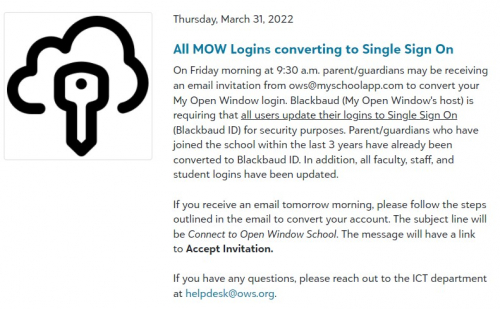
I've attached some information I gathered for our team to help troubleshoot when we receive requests. We added it to our weekly newsletter last Thursday and sent the invite on Friday morning. Not many issues so far. I have also inserted an image what is in our Newsfeed. We converted staff & students a couple years ago. The only other group for us was SOME parents (last few years I have used BBID for all new parents). If the parents have a gmail address, they will click "sign up with Google at the bottom of the page. If they do not, their username will be their email address on file. Best of luck everyone!
 0
0 -
I do want to ask one thing about users who are invited but do not complete the signup process within the 30-day window. We let parents know at the inquiry stage when a grade level is full and not considering applications. Most of those parents, understandably, don't bother applying, because there's no sense throwing money away for an application fee on an application that will likely go nowhere.
However, let's say a parent comes back for next year to apply again, and this time they have space in the preferred grade level so the parent wants to continue in the process now. Do they need to start the whole BBID creation process over again from the beginning? Will that user just show up in the “unregistered” tab again after 30 days, or do they just sit in limbo where the account is created but they can't do anything with it until support manually reconnects the account to BBID?
(@Brian Gray, you may know this!)
0 -
@Brian LeBlanc - I'm not sure what the behavior will be for parents of (non)applicants who did not complete the BB-ID account creation process, because we don't use Enrollment Management.
We have a similar situation with parents of incoming/current students. It's common for one parent to complete the BB-ID process and use the account, while the other parent doesn't ever sign in. Based on what I see in that situation, I think that if the user's record has a BB-ID assigned in Core (on the Access tab), then that BB-ID remains in the system and can be “activated” at any time. We alert the parent to watch for the invitation email and resend it. (The email sometimes goes to spam, so it helps to let the parent know that it's coming.)
0 -
Hi @Brian LeBlanc - as long as they are in the “Awaiting Status” state, they should be fine.
The next time they log in from the regular myschoolapp.com log-in page, they are prompted with a message that their username is being converted to BBID.
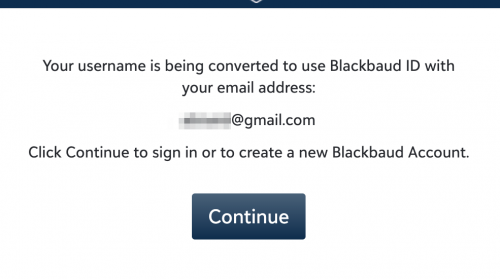
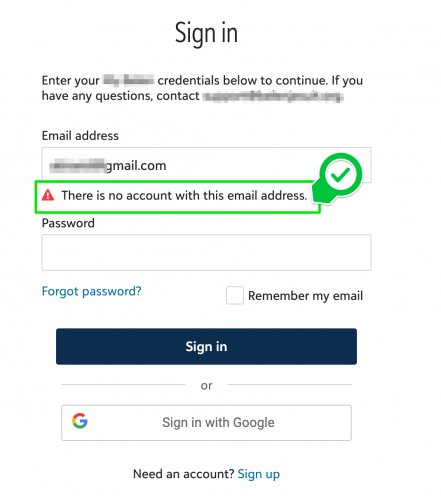
However, through the “Apply Link” log-in they will be re-directed to a Blackbaud ID log-in page with a notice that “There is no account with this email address.” So, they may get confused here.
 0
0 -
@Bryan Lorenzo - that's what I'm hoping for, but what worries me is that the documentation says that the invitations expire after 30 days. If that's the case, then I don't think users will stay in “Awaiting Status” beyond 30 days. And to @Brian Gray's point, it's exceptionally rare for both parents to be involved in the admissions/enrollment process. I have a bad feeling that we're going to be overrun with spouses who hadn't been previously involved that email support asking how they can see their child's report cards.
If all that happens is that the account becomes inactive after 30 days and we just have to click “no” on the access tab to reactivate it, that's not a big deal. I'm concerned that it might not be that easy, though, and I'd like to be ready if it isn't.
0 -
BlackBaud is forcing everyone to move to BBID by July 26th. We have been on BBID for employees and students since day one as we use Microsoft SSO as identity provider, and it works like a charm.
Parents account (however) is another story and we’ve been looking into turning it on for them for some time. We have done thorough testing and every time we do another test, we run into different issue / scenario for which there is no easy solution (sometimes) and even BlackBaud support cannot give concrete answers. We have to setup a new fake email address to test a new scenario every time; once it’s used you cannot re-use as it gets registered in BBID central database.
If a parent has a Gmail account the process is quite a seamless as it forces them to link it to Gmail authentication for SSO. For non-Gmail users it’s a totally different process. Also, when a parent receives an invitation (I believe), it has an expiration. What happens if a user does not follow the instructions within that timeframe? BlackBaud support does not have definite answers for all these scenarios.
In EMS, there's a newly added feature for applicant families to create BBID logins (EMS > Admissions > Admissions Setup > Applications Forms > “BBID Opt-in”). We have no way to test how it works without going live with it. When asked BB support, they couldn't explain the process clearly.
If we start mapping out all scenarios/options, it’s like a big decision tree ?
BlackBaud also boasts that BBID users (non Gmail) can setup MFA. Well, to setup MFA a parent has to use this link https://signin.blackbaud.com/userprofile/. Its not easy to find; however, if a parent discovers and clicks on this link the ONLY useful information on that page is to setup MFA. Other than that, they have access to information that they do not need and navigating out of that page is a nightmare.
Not sure if we are looking into this with too much scrutiny and making the process complex OR is it that tedious?
At the end of the day, it has to be a smooth experience for the parents.
Asim
4 -
Brian LeBlanc:
………If all that happens is that the account becomes inactive after 30 days and we just have to click “no” on the access tab to reactivate it, that's not a big deal. I'm concerned that it might not be that easy, though, and I'd like to be ready if it isn't.
Only the invitation becomes inactive after 30 days. All the admin will need to do is re-send the invitation from Core>Security>Blackbaud ID authentication>Awaiting Response tab. Hope that helps!
2 -
Jessi Walters:
Only the invitation becomes inactive after 30 days. All the admin will need to do is re-send the invitation from Core>Security>Blackbaud ID authentication>Awaiting Response tab. Hope that helps!This is music to my ears. Thank you, @Jessi Walters!
Let me ask one other thing: consider a scenario where a user creates their BBID, sets their password, and receives the email from Blackbaud saying “please click here to confirm your new account” but the user does not click the link in that email. After 30 days, what happens? Will it just re-send the confirmation email again the next time the user attempts to log in, or something else?
1 -
Reposting the resources I've adapted from Brian Gray for our students and parents/guardians that I also posted on the Blackbaud ID and Parents thread. Thank you, Brian!!
BBID Migration Plan (also contains the links below)
BBID Migration Emails to Parents and Guardians
BBID Migration Instructions for Parents and Guardians
5 -
Thank you for sharing these. They are super helpful!1
-
Brian LeBlanc:
Let me ask one other thing: consider a scenario where a user creates their BBID, sets their password, and receives the email from Blackbaud saying “please click here to confirm your new account” but the user does not click the link in that email. After 30 days, what happens? Will it just re-send the confirmation email again the next time the user attempts to log in, or something else?
In that scenario, a school admin would need to re-send the invitation. We require action by someone at the school to help protect the user account and reduce the likelihood that the wrong person could "get in."
2 -
Doesn't the BBID invitation expire after 24 hours? This deadline was included in automated messaging when we connected users via import and our consultant verified the deadline, but I don't see any mention of it in the user management BBID Invitation notification email template.
0 -
According to the following Knowledgebase Article, they expire after 30 days - I hope this is still true:
1 -
I believe the ‘confirm identity’ email users get when they are in the middle of the actual conversion expires after 24 hours, not the BBID invitation (which I think is 30 days).
1 -
Actually, we decided to time our migration to the release of year-end report cards. Motivated parents will certainly manage the speedbump to view report cards. What we do not want is to create any obstacle around (re-)enrollment contracts and/or required student forms.
2


























Categories
- All Categories
- New K-12 Community Home (TEST)
- New Higher Education Home Page (Test)
- New Impact Edge Community TEST
- New YourCause Community TEST
- New SKY Community TEST
- New Grantmaking TEST Community
- New Altru Test Community
- New bbcon Community - TEST
- 12 Blackbaud Agents for Good™
- New Raiser's Edge NXT Community
- 8 Blackbaud Community Help
- 222 bbcon®
- 1.4K Blackbaud Altru®
- 411 Blackbaud Award Management™ and Blackbaud Stewardship Management™
- 1.2K Blackbaud CRM™ and Blackbaud Internet Solutions™
- 16 donorCentrics®
- 361 Blackbaud eTapestry®
- 2.7K Blackbaud Financial Edge NXT®
- 688 Blackbaud Grantmaking™
- 604 Blackbaud Education Management Solutions for Higher Education
- 3.3K Blackbaud Education Management Solutions for K-12 Schools
- 954 Blackbaud Luminate Online® and Blackbaud TeamRaiser®
- 85 JustGiving® from Blackbaud®
- 7.1K Blackbaud Raiser's Edge NXT®
- 4K SKY Developer
- 258 ResearchPoint™
- 123 Blackbaud Tuition Management™
- 165 Organizational Best Practices
- 249 Member Lounge (Just for Fun)
- 40 Blackbaud Community Challenges
- 37 PowerUp Challenges
- 3 (Closed) PowerUp Challenge: Grid View Batch
- 3 (Closed) PowerUp Challenge: Chat for Blackbaud AI
- 3 (Closed) PowerUp Challenge: Data Health
- 3 (Closed) Raiser's Edge NXT PowerUp Challenge: Product Update Briefing
- 3 (Closed) Raiser's Edge NXT PowerUp Challenge: Standard Reports+
- 3 (Closed) Raiser's Edge NXT PowerUp Challenge: Email Marketing
- 3 (Closed) Raiser's Edge NXT PowerUp Challenge: Gift Management
- 4 (Closed) Raiser's Edge NXT PowerUp Challenge: Event Management
- 3 (Closed) Raiser's Edge NXT PowerUp Challenge: Home Page
- 4 (Closed) Raiser's Edge NXT PowerUp Challenge: Standard Reports
- 4 (Closed) Raiser's Edge NXT PowerUp Challenge: Query
- 829 Community News
- 3.1K Jobs Board
- 57 Blackbaud SKY® Reporting Announcements
- 47 Blackbaud CRM Higher Ed Product Advisory Group (HE PAG)
- 19 Blackbaud CRM Product Advisory Group (BBCRM PAG)