New Fundraiser On The Go Features In SP14


We have been working hard on Fundraiser on the Go, and are excited to announce upcoming additions to the application. By upgrading to SP14 in September, users will discover a new host of Fundraiser on the Go features, including a Search All tab, view addresses, and see a constituent’s image. Below you will find a short description of each feature and a preview of what they will look like. We hope you are as excited as we are!
Search Constituents:
The biggest request we heard to improve Fundraiser on the Go was letting fundraisers search all constituents through the application, in addition to seeing their list of assigned prospects. With the updates in Service Pack 14, users of Fundraiser on the Go will have access to their entire constituent database right on their phones! Check out the screenshots below to see what the new layout of Fundraiser on the Go will look like:
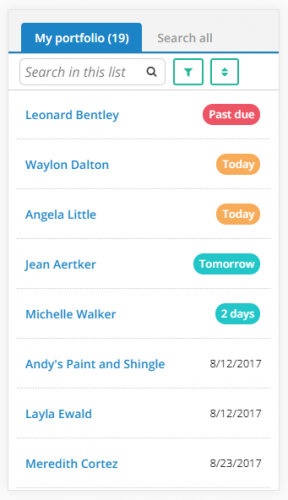
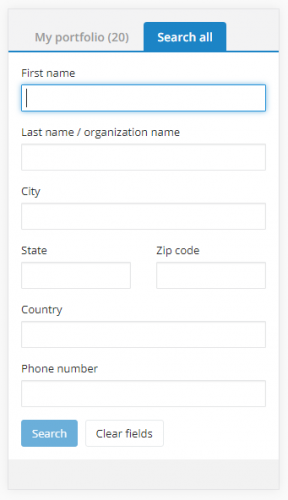
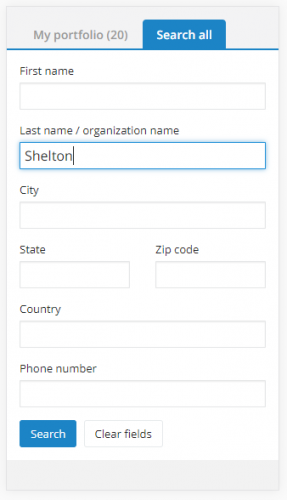
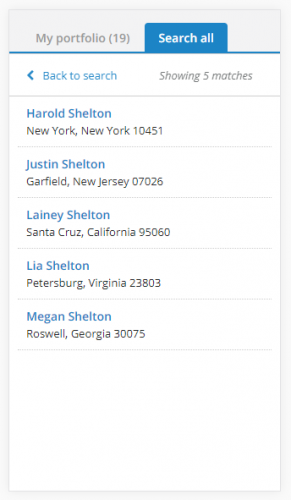
The Search All tab allows you to search through everyone in your organization's database, while the My Portfolio tab lets you see your list of assigned prospects. The fields provided in the Search All tab include First name, Last name/Organization name, City, State, Zip code, Country, and Phone number. With the search feature, a user can input any information they know into the fields and receive any relevant search results.
View Addresses:
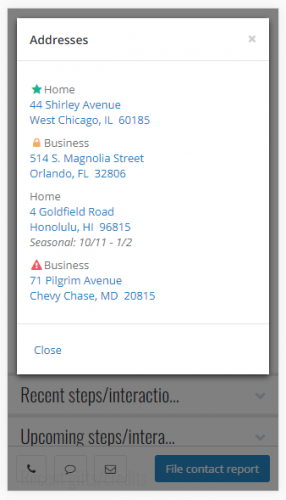
In the SP14 update, we’ve added addresses to profile pages in Fundraiser on the Go. By clicking on the “View Addresses” link on a profile, fundraisers open a pop-up box, which includes any addresses for the prospect or constituent. The primary address is listed first, followed by any remaining addresses (up to five). These addresses link to Google Maps, so fundraisers can easily see where the address is.
Last, but not least… Images:
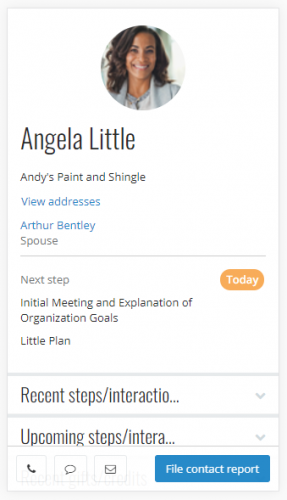
If an organization includes images in constituents’ profiles, fundraisers now see those same images on the constituent or prospect’s profile in Fundraiser on the Go! As you can see in the screenshot under addresses, a fundraiser can check out Angela Little's picture before heading to their meeting with her.
If these updates have you over the moon, and you can’t wait to start using Fundraiser on the Go, check out this post on setting up Fundraiser on the Go and this one which covers FAQs about Fundraiser on the Go! As always, reach out with any questions or concerns.
Search Constituents:
The biggest request we heard to improve Fundraiser on the Go was letting fundraisers search all constituents through the application, in addition to seeing their list of assigned prospects. With the updates in Service Pack 14, users of Fundraiser on the Go will have access to their entire constituent database right on their phones! Check out the screenshots below to see what the new layout of Fundraiser on the Go will look like:


The Search All tab allows you to search through everyone in your organization's database, while the My Portfolio tab lets you see your list of assigned prospects. The fields provided in the Search All tab include First name, Last name/Organization name, City, State, Zip code, Country, and Phone number. With the search feature, a user can input any information they know into the fields and receive any relevant search results.
View Addresses:
In the SP14 update, we’ve added addresses to profile pages in Fundraiser on the Go. By clicking on the “View Addresses” link on a profile, fundraisers open a pop-up box, which includes any addresses for the prospect or constituent. The primary address is listed first, followed by any remaining addresses (up to five). These addresses link to Google Maps, so fundraisers can easily see where the address is.


Last, but not least… Images:
If an organization includes images in constituents’ profiles, fundraisers now see those same images on the constituent or prospect’s profile in Fundraiser on the Go! As you can see in the screenshot under addresses, a fundraiser can check out Angela Little's picture before heading to their meeting with her.
If these updates have you over the moon, and you can’t wait to start using Fundraiser on the Go, check out this post on setting up Fundraiser on the Go and this one which covers FAQs about Fundraiser on the Go! As always, reach out with any questions or concerns.
0
Categories
- All Categories
- New K-12 Community Home (TEST)
- New Higher Education Home Page (Test)
- New Impact Edge Community TEST
- New YourCause Community TEST
- New SKY Community TEST
- New Grantmaking TEST Community
- New Altru Test Community
- New bbcon Community - TEST
- 12 Blackbaud Agents for Good™
- New Raiser's Edge NXT Community
- 8 Blackbaud Community Help
- 222 bbcon®
- 1.4K Blackbaud Altru®
- 410 Blackbaud Award Management™ and Blackbaud Stewardship Management™
- 1.2K Blackbaud CRM™ and Blackbaud Internet Solutions™
- 16 donorCentrics®
- 361 Blackbaud eTapestry®
- 2.7K Blackbaud Financial Edge NXT®
- 687 Blackbaud Grantmaking™
- 604 Blackbaud Education Management Solutions for Higher Education
- 3.3K Blackbaud Education Management Solutions for K-12 Schools
- 954 Blackbaud Luminate Online® and Blackbaud TeamRaiser®
- 85 JustGiving® from Blackbaud®
- 7K Blackbaud Raiser's Edge NXT®
- 4K SKY Developer
- 258 ResearchPoint™
- 123 Blackbaud Tuition Management™
- 165 Organizational Best Practices
- 248 Member Lounge (Just for Fun)
- 40 Blackbaud Community Challenges
- 37 PowerUp Challenges
- 3 (Closed) PowerUp Challenge: Grid View Batch
- 3 (Closed) PowerUp Challenge: Chat for Blackbaud AI
- 3 (Closed) PowerUp Challenge: Data Health
- 3 (Closed) Raiser's Edge NXT PowerUp Challenge: Product Update Briefing
- 3 (Closed) Raiser's Edge NXT PowerUp Challenge: Standard Reports+
- 3 (Closed) Raiser's Edge NXT PowerUp Challenge: Email Marketing
- 3 (Closed) Raiser's Edge NXT PowerUp Challenge: Gift Management
- 4 (Closed) Raiser's Edge NXT PowerUp Challenge: Event Management
- 3 (Closed) Raiser's Edge NXT PowerUp Challenge: Home Page
- 4 (Closed) Raiser's Edge NXT PowerUp Challenge: Standard Reports
- 4 (Closed) Raiser's Edge NXT PowerUp Challenge: Query
- 829 Community News
- 3.1K Jobs Board
- 57 Blackbaud SKY® Reporting Announcements
- 47 Blackbaud CRM Higher Ed Product Advisory Group (HE PAG)
- 19 Blackbaud CRM Product Advisory Group (BBCRM PAG)