Sharing my Power Automate template: Conditional Acknowledgments with pledge and primary contact information
Comments
-
@Kelly Hogan Did you see this post? I waled Eileen through a couple possible reasons for that error.
1 -
@Hallie Guiseppe Yes, thank you!
Working through those things now to see if I can figure it out! Lots of change one small thing then test. I still keep getting the error, but I suspect I have something typed wrong or in the wrong place.
0 -
template element missing means you did not define any field in the template word document to be filled out by power automate.
Some confusion many had was, they were using the "Mailing" tab to add merge field, that is not the correct "element". You need to go to the Developer tab and click on Design mode to add element.
1 -
@Alex Wong , I didn't change the templates provided in the download. I wanted to get it functioning before I even messed with the templates. And it functions properly if I point it to one file, it just doesn't seem to like something in the coding for picking different letters.
1 -
@Hallie Guiseppe & @Alex Wong I ended up deleting it and reimporting. It seems to be working now! I guess I messed something up as I was trying to figure things out. Honestly, it's been a great learning experience trying to figure out all of the pieces and what they do. Thank you both for your help and for the templates you all share!
1 -
I am having problems getting the letter body to print after making changes. It does print the letter head on the file, but not letter body.
After updating or changing the receipt template, I have updated both the Populate a Microsoft Word Template - Letter and the Compose Letter Variable. This did refresh the file schema in the Populate a Microsoft Word Template - Letter.
I'm wondering about updating the Word Template itself.I downloaded it. Made a few changes, saved it, and uploaded to SharePoint folder.
After making changes to the a field in the letter is there another step that must be done to finalize the letter before I upload it to SharePoint again?How do I know if the letter template has been broken so the flow will not use it?
The flow runs and does produce a letter when I use the included templates but not ones that i have adjusted.
What am I missing?
In the raw output of the letter, it show everthing that should be showing in the letter, but is not showing in the saved letter in SharePoint.
0 -
Good morning, Candy, I am having trouble following your steps. Can you paste in some visuals that show the issue? If I understand your comment correctly, it sounds like you updated the template, but the merge is outputting information from the template still, is that correct? If so, you may need to update the step in the flow called "Compose Letter Variable." It may be that it isn't composing your variable correctly. Here is a snip of one of my runs that shows the letter it selected from SharePoint to merge:
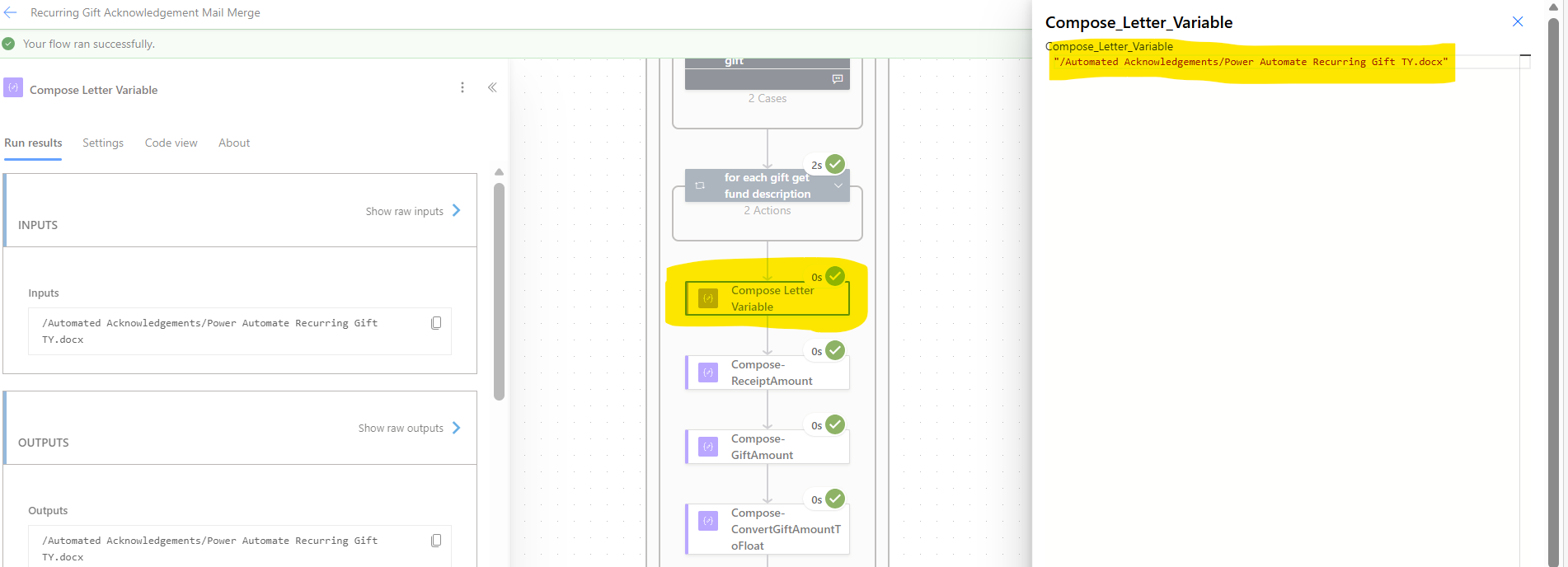
Can you take a look and see what letter your flow is selecting and see if that is correct?
0 -
@Hallie Guiseppe Sorry I haven't gotten back sooner.
The flow is running successfully. I had tried to update the letter template and something must have gotten changed on it. It would load the letter but I could only see the letter head, not the body narrative. I changed the letter back to a previous one and it is sending a letter to the Sharepoint folder now. It is showing the body of the letter now.
Thanks for checking.
1















Categories
- All Categories
- New K-12 Community Home (TEST)
- New Higher Education Home Page (Test)
- New Impact Edge Community TEST
- New YourCause Community TEST
- New SKY Community TEST
- New Grantmaking TEST Community
- New Altru Test Community
- New bbcon Community - TEST
- 12 Blackbaud Agents for Good™
- New Raiser's Edge NXT Community
- 8 Blackbaud Community Help
- 222 bbcon®
- 1.4K Blackbaud Altru®
- 410 Blackbaud Award Management™ and Blackbaud Stewardship Management™
- 1.2K Blackbaud CRM™ and Blackbaud Internet Solutions™
- 16 donorCentrics®
- 361 Blackbaud eTapestry®
- 2.7K Blackbaud Financial Edge NXT®
- 687 Blackbaud Grantmaking™
- 603 Blackbaud Education Management Solutions for Higher Education
- 3.3K Blackbaud Education Management Solutions for K-12 Schools
- 954 Blackbaud Luminate Online® and Blackbaud TeamRaiser®
- 85 JustGiving® from Blackbaud®
- 7K Blackbaud Raiser's Edge NXT®
- 4K SKY Developer
- 258 ResearchPoint™
- 123 Blackbaud Tuition Management™
- 165 Organizational Best Practices
- 248 Member Lounge (Just for Fun)
- 40 Blackbaud Community Challenges
- 37 PowerUp Challenges
- 3 (Closed) PowerUp Challenge: Grid View Batch
- 3 (Closed) PowerUp Challenge: Chat for Blackbaud AI
- 3 (Closed) PowerUp Challenge: Data Health
- 3 (Closed) Raiser's Edge NXT PowerUp Challenge: Product Update Briefing
- 3 (Closed) Raiser's Edge NXT PowerUp Challenge: Standard Reports+
- 3 (Closed) Raiser's Edge NXT PowerUp Challenge: Email Marketing
- 3 (Closed) Raiser's Edge NXT PowerUp Challenge: Gift Management
- 4 (Closed) Raiser's Edge NXT PowerUp Challenge: Event Management
- 3 (Closed) Raiser's Edge NXT PowerUp Challenge: Home Page
- 4 (Closed) Raiser's Edge NXT PowerUp Challenge: Standard Reports
- 4 (Closed) Raiser's Edge NXT PowerUp Challenge: Query
- 829 Community News
- 3.1K Jobs Board
- 57 Blackbaud SKY® Reporting Announcements
- 47 Blackbaud CRM Higher Ed Product Advisory Group (HE PAG)
- 19 Blackbaud CRM Product Advisory Group (BBCRM PAG)