How to find attribute IDs for specific attributes





We had to request a backup copy of our database recently for a deleted record. I'm trying to get back the attribute/custom fields. By process of elimination I was able to figure out 5 of the 10, but the remaining 5 have no text or comments in the fields only the Attributes ID and Attribute Types ID. Anyone have any magic insight as to where I find those. When I try querying, it appears only the attribute import ID comes out which is not what I'm looking for. Thanks in advance!
Best Answers
-
not exactly sure what you are trying to do, but if you want the attribute id, that's not the same as *** attribute import id (i.e. Consittuent Attribute Import ID). Attribute ID is the ID assigned to the attribute category, not the individual attribute for a constituent record.
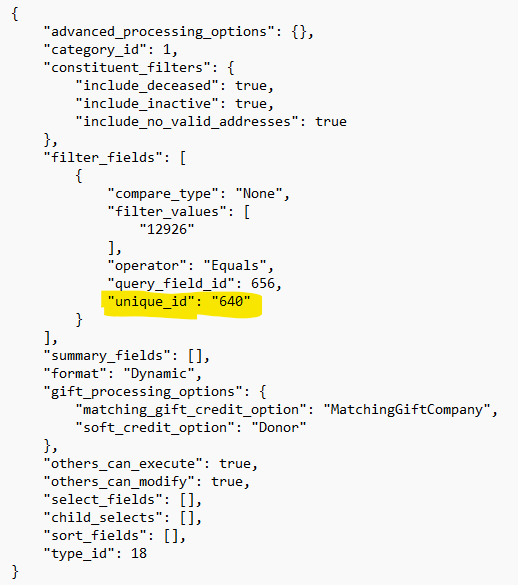
If you are on RE NXT, you can use Query, select the attribute (custom field) category's description or any field) as filter or output, then go to Option and Copy JSON. paste into notepad.

the unique_id is the attribute id
 1
1 -
Thank you @Alex Wong! What I had been trying to do, was from the record that no longer existed within RE/NXT, the backup file had many code #s/IDs for the various fields but did not give the actual field names. Our IT department was able to provide most of the data but I was trying to figure out where to get some of the actual table names that the code #s referenced. It was from that information by process of elimination I was able to decipher what the field names were. Our IT department had been extremely helpful in securing the backup and finding that missing record, I was trying to be proactive in not having to ask them for additional data. :) Appreciate this community!
0






Answers
-
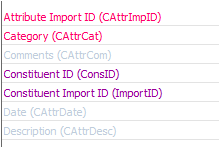
If you use Import in the database view you can export all of the fields necessary for backing up your attributes. The hot pink are required and the purple are conditionally required.
What I like to run is a query I shrunk the name field (third column) to protect our data. I export this data before deleted any attribute from the system on the off chance someone regrets it (no one has ever in my time here) so I can restore it.
I do have to update the fields each time so that it reflects the Import ID, Description, Data, and Comment of the specific attribute.
I don't know of any other ids involved with attributes. This system has worked well for our org for the last 20 years. We will see how this all works next year.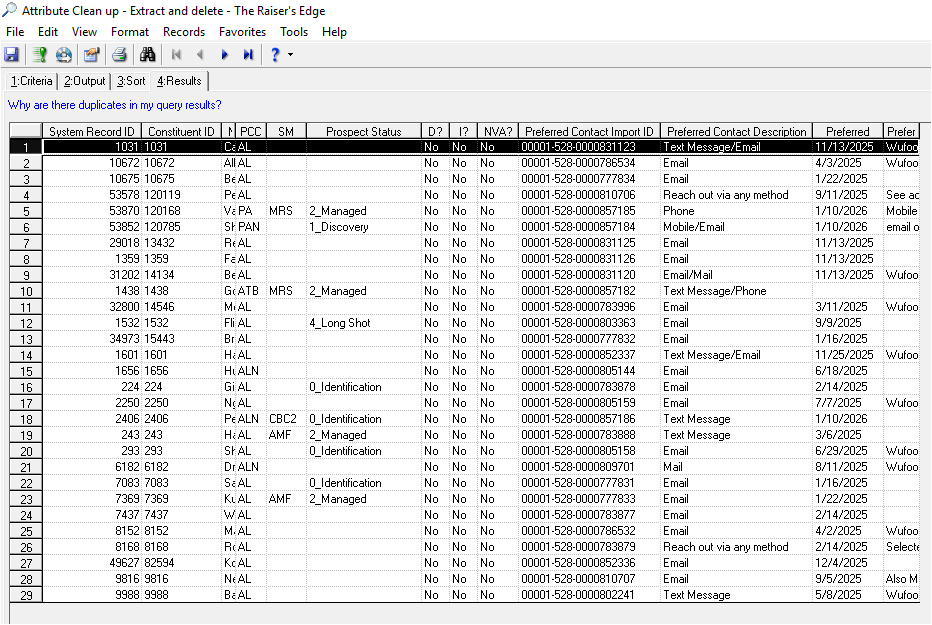 1
1 -
Sorry, I should have elaborated more. The file that comes back from BB is coded and the schema data is what is strictly coding where my need to have been able to decipher what those tables were connected to. By "process of elimination" for the section I was working on, I believe I have figured out the action types and have been able to replace the data within the Action area of the database. I appreciate your insight @Elizabeth Johnson!
1





Categories
- All Categories
- New YourCause Community TEST
- New SKY Community TEST
- New Grantmaking TEST Community
- New Altru Test Community
- New bbcon Community - TEST
- 12 Blackbaud Agents for Good™
- New Raiser's Edge NXT Community
- 7 Blackbaud Community Help
- 218 bbcon®
- 1.4K Blackbaud Altru®
- 409 Blackbaud Award Management™ and Blackbaud Stewardship Management™
- 1.2K Blackbaud CRM™ and Blackbaud Internet Solutions™
- 16 donorCentrics®
- 361 Blackbaud eTapestry®
- 2.7K Blackbaud Financial Edge NXT®
- 681 Blackbaud Grantmaking™
- 599 Blackbaud Education Management Solutions for Higher Education
- 3.3K Blackbaud Education Management Solutions for K-12 Schools
- 952 Blackbaud Luminate Online® and Blackbaud TeamRaiser®
- 85 JustGiving® from Blackbaud®
- 7K Blackbaud Raiser's Edge NXT®
- 3.9K SKY Developer
- 257 ResearchPoint™
- 123 Blackbaud Tuition Management™
- 165 Organizational Best Practices
- 247 Member Lounge (Just for Fun)
- 40 Blackbaud Community Challenges
- 37 PowerUp Challenges
- 3 (Closed) PowerUp Challenge: Grid View Batch
- 3 (Closed) PowerUp Challenge: Chat for Blackbaud AI
- 3 (Closed) PowerUp Challenge: Data Health
- 3 (Closed) Raiser's Edge NXT PowerUp Challenge: Product Update Briefing
- 3 (Closed) Raiser's Edge NXT PowerUp Challenge: Standard Reports+
- 3 (Closed) Raiser's Edge NXT PowerUp Challenge: Email Marketing
- 3 (Closed) Raiser's Edge NXT PowerUp Challenge: Gift Management
- 4 (Closed) Raiser's Edge NXT PowerUp Challenge: Event Management
- 3 (Closed) Raiser's Edge NXT PowerUp Challenge: Home Page
- 4 (Closed) Raiser's Edge NXT PowerUp Challenge: Standard Reports
- 4 (Closed) Raiser's Edge NXT PowerUp Challenge: Query
- 822 Community News
- 3.1K Jobs Board
- 57 Blackbaud SKY® Reporting Announcements
- 47 Blackbaud CRM Higher Ed Product Advisory Group (HE PAG)
- 19 Blackbaud CRM Product Advisory Group (BBCRM PAG)