What do I have to do to get RE to reflect the proper name of our organization?

Our organization changed names about 5 years ago and RE will not change our account to the new name. Therefore, EVERY report that we generate has our old name on it and is a useless document unless it is edited. Now that RE sends out documents with out giving users the opportunity to edit (see my post about Giving Statements), I would like to know who do I contact to get our proper name on our account? I have reached out to customer service about this and nothing ever gets done. Thank you.


Answers

  • Faith Murray
    Faith Murray Community All-Star
    Tenth Anniversary Kudos 5 First Reply Name Dropper

    Valerie, this can be changed under your Admin account (outside of Raiser's Edge). Go to Admin, Branding, and update the Organization name, as below. In my tests, changing the name here automatically changed the name on the webview Giving Statement PDFs.

    image.png
  • Valerie Van Selous
    edited January 27

    Thank you very much for getting back to me, however I am want to confirm who you mean by the:

    "Admin account (outside of Raiser's Edge)"

    While I am an Admin for RE, is it correct to say that the "Admin account (outside of Raiser's Edge)" is someone different? Perhaps the people in the department who pays the bills and manage the account? This does make sense.

    If so, can someone please send over a more complete set of official instructions? I am not sure how comfortable people in this department would be if I just sent over informal instructions that answer a question that I asked (and that I so appreciate, but might confuse those who are not thinking about this issue.

    Can someone share a knowledgebase article I can share with these people? I would also like to share these instructions with the head of our department, especially before making such a global change.

    Thanks again, Faith, I appreciate you jumping in to solve my problem! 😀Valerie

  • Chris Hounsell
    edited January 28
    • The solution admin can so this … the person(s) who has access to everything in the database including adding/removing users, etc…
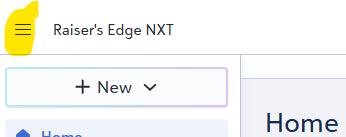
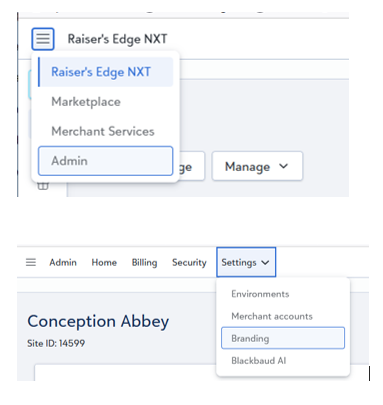
    • 1. Click on stacked 'pancakes' in top left corner next to 'Raiser's Edge NXT' (Image below)
    • 2. Select 'Admin' from the dropdown list
    • 3. Select 'Settings' from top menu and click 'Branding'
    • 4. Click on 'Manage branding elements' and you should see what Faith was referring to.
    Screenshot 2026-01-28 102046.png
  • Faith Murray
    Faith Murray Community All-Star
    Tenth Anniversary Kudos 5 First Reply Name Dropper
    edited January 28

    Yes, this is the Admin area for your solution (Raiser's Edge, Financial Edge, etc.) The person who pays the bills usually is an Admin, but hopefully your DBM will also have Admin privileges. Here's how to get there:

    image.png

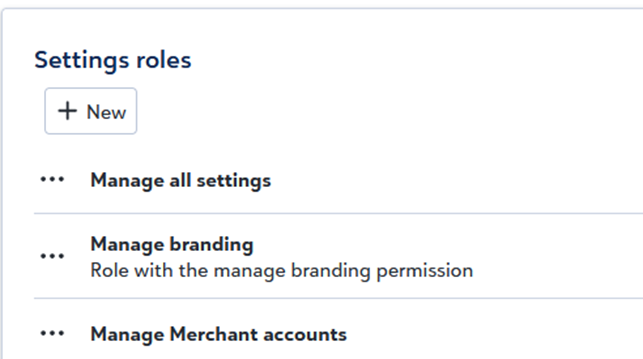
    But here is a Knowledgebase article with pictures that looks more "official" in case you have to go through someone else at your org. While you're at it, tell them you need Admin access so you can configure Branding logos, access your Customer Success Manager, etc! If they are hesitant to provide all-access, tell them they can give you defined (limited) user privileges to only certain Admin functions, in the Admin-Security Roles, as below.

    image.png
  • You are both incredibly awesome! Thanks! 😀

Categories